UK
UK US
US EU
EU AUD
AUD Global

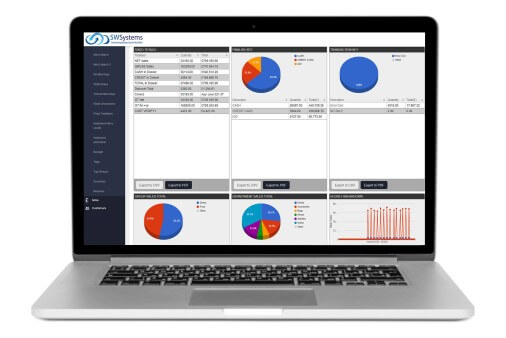
Wiltshire POS Systems Integrations: Accounting, CRM & eCommerce
In today’s fast-moving retail and services environment, your Point of Sale (POS) system must be more than a cash register — it should be a central hub that connects accounting, CRM, and eCommerce.
At South West Systems, we’ve helped dozens of businesses in Wiltshire and across the South West adopt POS systems that integrate seamlessly with all parts of their operations. In this guide, you’ll learn why those integrations matter, how to implement them, and what to watch out for — so your business becomes stronger, faster, and more scalable.
We’ll naturally use key terms such as “Wiltshire POS integration,” “POS accounting integration,” and “POS CRM integration” throughout to align with both SEO and AIDO (Artificial Intelligence Delivery Optimisation) best practices.
Why Integrations Matter: The Business Case
Eliminate Data Silos & Reduce Manual Work
When POS, accounting, CRM, and your online shop operate separately, your team wastes valuable time on exporting, importing, and double-checking data. Integration allows your POS to automatically:
-
Post sales and returns to accounting (e.g. Xero, QuickBooks, Sage)
-
Update customer profiles in your CRM (contact info, purchase history, loyalty points)
-
Sync inventory and orders with your eCommerce platform (Magento, Shopify, WooCommerce)
This reduces manual reconciliation, prevents human error, and frees up staff time for business growth.
Real-Time Insights Drive Smarter Decisions
With integrated data, you gain instant visibility into your business:
-
Identify top-selling products across in-store and online channels
-
Segment customers by purchase behaviour and send targeted offers
-
Forecast demand accurately to prevent stock shortages
This unified view supports faster decision-making and smarter business planning.
Better Customer Experience = Loyalty & Upsell
When your systems communicate smoothly:
-
Returning customers are recognised instantly at checkout
-
Online and in-store credits sync perfectly
-
CRM campaigns use accurate sales data for tailored promotions
This builds trust, increases loyalty, and boosts repeat business.
Key Integration Paths & Technical Considerations
POS ↔ Accounting Integration
What Needs Syncing
-
Sales revenue, refunds, discounts, and taxes
-
Payments, cash adjustments, and transaction fees
-
Cost of goods sold and stock valuations
Common Challenges & How to Overcome Them
-
Chart of accounts mapping: Ensure POS categories align wi
-
th your accounting structure.
-
VAT accuracy: Match inclusive vs exclusive pricing models carefully.
-
Sync frequency: Choose between real-time or batch syncing based on volume.
-
Audit control: Keep full logs of every data exchange for compliance.
POS ↔ CRM Integration
What Gets Shared
-
Customer details (name, email, phone)
-
Purchase and loyalty data
-
Returns, support cases, and preferences
Best Practices
-
Use consistent identifiers to avoid duplicate records.
-
Enable near real-time syncing for accurate customer insights.
-
Define a “master source” for data fields to prevent overwriting.
-
Comply with GDPR through encryption and consent-based data storage.
POS ↔ eCommerce Integration
Sync Elements
-
Product catalogue and SKU data
-
Inventory levels and stock availability
-
Online and in-store orders
-
Returns and refunds
Considerations & Pitfalls
-
Keep SKU names consistent between systems.
-
Prevent overselling through fast, reliable inventory syncing.
-
Ensure your Magento integration module is tested for speed and stability.
-
Minimise latency — delays can cause customer frustration and stock errors.

How South West Systems Implements POS Integrations
Here’s our proven integration roadmap for businesses in Wiltshire and across the South West:
| Phase | What We Do | Key Deliverables |
|---|---|---|
| Discovery & Audit | Review existing POS, accounting, CRM, and eCommerce systems | Integration plan and data maps |
| Planning & Design | Define data flow and sync frequency | Flow diagrams and connection maps |
| Setup / Customisation | Configure or develop APIs and connectors | Middleware setup and transformation logic |
| Testing & Validation | Simulate real transactions to ensure accuracy | Reconciliation reports and test logs |
| Go-Live & Monitoring | Deploy and monitor live syncs | Dashboard alerts and fallback recovery |
| Maintenance & Updates | Ongoing performance review | Version updates and SLA support |
At every stage, South West Systems provides expert configuration, technical assurance, and hands-on training to ensure a smooth go-live.
Frequently Asked Questions
Can I integrate any POS with accounting, CRM, and eCommerce?
Not all POS systems support full integrations. We recommend systems with open APIs or dedicated connector modules to ensure flexibility and performance.
How long does an integration take?
A simple integration can be completed in 2–4 weeks. More complex, multi-system setups usually take 6–12 weeks, including testing and fine-tuning.
How much does it cost?
Costs depend on the systems involved, the scope of data syncing, and whether custom development is required. Contact us for a tailored quotation.
How do you ensure data security?
We use encrypted connections (TLS), role-based access, and GDPR-compliant storage. All integrations are monitored for accuracy and security.
Success Stories & ROI Metrics
Our Wiltshire clients have achieved measurable results:
“After integrating our POS with Xero and Magento, we reduced accounting errors by 30% and increased online revenue by 15% in just six months.”
Real-world results like these demonstrate the power of integrated systems in improving efficiency and profitability.
Next Steps
If you’re ready to connect your POS system with accounting, CRM, and eCommerce, we’re here to help:
-
Book a free consultation with our integration specialists.
-
Assess your existing tech stack for compatibility.
-
Plan your integration roadmap with minimal disruption.
-
Launch with full support from the South West Systems team.
Contact South West Systems
To discuss your POS integration project or get expert advice, contact us today:
-
Phone: 01392 275324
-
Email: info@southwestsystemsuk.com