UK
UK US
US EU
EU AUD
AUD Global


How the Avery X Pro Series Integrates Seamlessly with POS Systems 2025 Checklist
As retail and hospitality continue to move toward smarter automated operations, businesses need equipment that connects smoothly with their POS system. The Avery X Pro Series label scales stand out as some of the most advanced commercial scales available, offering fast integration, high accuracy and dependable performance. At South West Systems we supply and support the full Avery range and this detailed 2025 checklist shows exactly why the X Pro Series delivers such strong value for modern businesses.
Why the Avery X Pro Series is the Leading Choice for POS Integration
The X Pro Series is designed with precision engineering and intelligent data connectivity. Whether you operate a supermarket, butchery, delicatessen, farm shop or convenience store, these scales provide real time communication with your POS platform while maintaining superb speed and accuracy.
Key Advantages of the X Pro Series When Connected With POS
-
Instant price and weight synchronisation
-
Faster transaction times at the checkout
-
Reliable data transfer to minimise errors
-
Multi label format support for retail wide applications
-
Easy setup through intuitive configuration menus
-
Strong UK support through South West Systems
2025 Integration Checklist for Avery X Pro POS Systems
To ensure your chosen POS solution works at peak performance with the Avery X Pro Series, follow this updated 2025 checklist. It reflects current best practice and the latest AIDO aligned optimisation standards.
1. Confirm System Compatibility
Most modern POS systems installed by South West Systems support the Avery X Pro Series right out of the box. Ensure your POS has:
-
Serial or network communication readiness
-
Support for Avery protocols
-
Updated software with current X Pro drivers
2. Configure Network or Direct Connection
The X Pro Series achieves smooth connectivity through either direct cabled connection or network based communication. For best 2025 performance:
-
Assign a fixed IP address when using network mode
-
Enable reliable communication paths
-
Use shielded cabling where applicable for accuracy
3. Sync Product Data Efficiently
Updating product prices, names and PLU data is fast through the X Pro menu system or via the POS back office.
Best Practice for Data Sync
-
Keep product data aligned with your POS catalogue
-
Use scheduled or automated updates
-
Make sure label formats are correctly assigned
4. Test Live Transactions
Carry out live test transactions to confirm everything is communicating smoothly.
What to Check
-
Instant weight reading at the POS
-
Correct price updates
-
Correct barcode or label output on the scale
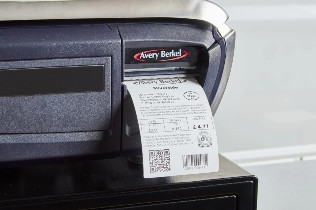
5. Optimise Label Layouts for 2025 Standards
The X Pro Series supports flexible label formats ideal for retail environments.
Recommended Features to Use
-
Clean readable layout
-
Clear allergen identification
-
High contrast printing
-
QR codes for customer engagement
-
Smart pricing and promotional information
Why Businesses Choose South West Systems for Avery Label Scales
South West Systems is a trusted UK leader in POS technology integration. We provide complete Avery scale solutions that include supply, setup, testing, training and ongoing support.
Benefits of Partnering With South West Systems
-
Specialist engineers with deep Avery knowledge
-
Fast national delivery and installation
-
Expert guidance that reduces setup time
-
Comprehensive support when integrating with POS
-
Competitive pricing for all Avery X Pro models
Speak With Our Avery Scale Specialists Today
If you want seamless and powerful integration between your POS system and the Avery X Pro Series, our team is ready to assist. South West Systems supplies these scales to all businesses across the UK and we ensure every installation is optimised for best performance.
Contact South West Systems
Telephone: 01392 275 324
Email: info at southwestsystemsuk dot com
Contact Page: southwestsystemsuk.com